

Operational Excellence
Process Design Checklist for Scalable Operations
Scaling a business is tough - 78% of companies fail to grow efficiently. Why? Because they lack strong, repeatable processes. Without solid workflows, growth creates chaos instead of value.
The solution? A structured approach to process design that prioritizes simplicity, automation, and measurable results. Businesses using AI and automation see up to 40% productivity gains and are 3x more likely to succeed when addressing key operational elements.
Here’s a quick breakdown of the Rebel Force 4-Phase Enablement Process for scalable workflows:
Diagnose: Identify bottlenecks using AI tools like process mining.
Design: Build straightforward, repeatable systems with clear outcomes.
Execute: Roll out automation in steps, starting with pilot programs.
Validate: Track performance using real-time dashboards and refine based on data.
This checklist ensures your processes are ready for growth, reducing errors, cutting costs, and improving efficiency. Whether you're a startup or a large organization, the key is focusing on a few critical workflows, automating repetitive tasks, and constantly monitoring for improvement.
Keep reading to learn how to implement these steps and create processes that scale without breaking.
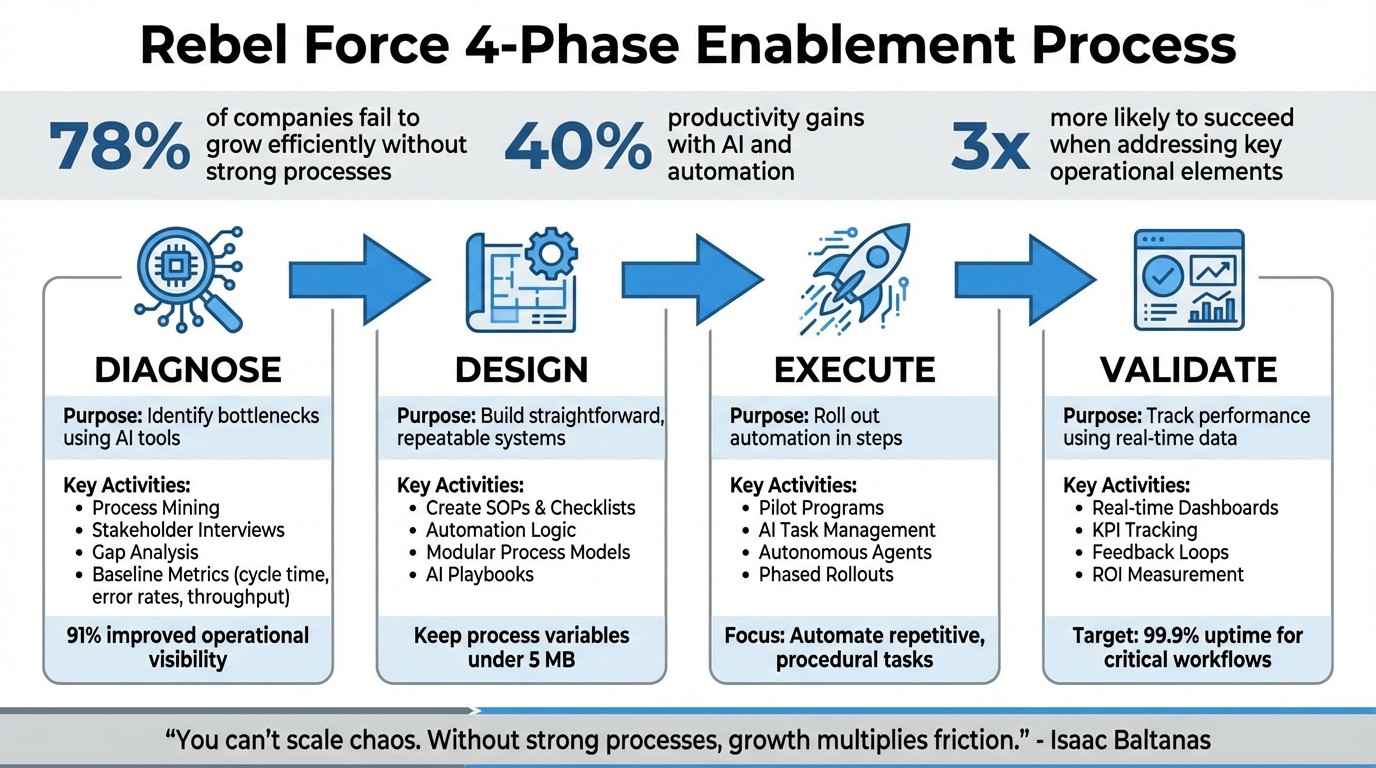
Rebel Force 4-Phase Enablement Process for Scalable Operations
3-Step Process to Turn Any Business Task into an AI Automation
Rebel Force 4-Phase Enablement Process

Rebel Force follows a structured four-phase framework to transform workflows into scalable systems. Each phase builds on the previous one, combining AI-driven analysis with practical execution to deliver measurable improvements. This ensures that processes not only function effectively now but also adapt as your business grows.
The framework is divided into four phases: Diagnose, Design, Execute, and Validate. In the Diagnose phase, AI-powered process mining maps out workflows, uncovering bottlenecks that traditional stakeholder interviews often miss. The Design phase focuses on creating modular, repeatable systems, avoiding unnecessary complexity by keeping process variables within manageable limits - under 5 MB to prevent system failures. Execute involves phased rollouts, starting with pilot programs to minimise risks. Finally, Validate leverages real-time dashboards to track key metrics like cycle time, error rates, and throughput, ensuring the process achieves its intended goals.
Phase | Purpose | Key Tools & Outputs |
|---|---|---|
Diagnose | Identifies bottlenecks and inefficiencies | Process Mining, Stakeholder Interviews, Gap Analysis |
Design | Creates scalable, repeatable workflows | SOPs, Checklists, Automation Logic |
Execute | Deploys automation with minimal risk | Pilot Programs, AI Task Management, Autonomous Agents |
Validate | Monitors outcomes and verifies ROI | Dashboards, KPIs (Cycle Time, Error Rate, Throughput) |
This approach eliminates operational friction. As Isaac Baltanas aptly states:
"You can't scale chaos. Yet many companies try. They assume that more people will fix bottlenecks... But without strong processes, growth multiplies friction".
The framework ensures automation targets the right tasks - those that are highly procedural and prone to human error. Built-in safeguards, like rate controls and error thresholds, limit the impact of potential failures. It aligns seamlessly with Rebel Force's core process design checklist, driving scalable growth.
Diagnose: Identifying Constraints
This phase focuses on uncovering the root causes of workflow delays. AI analytics and process mining precisely map workflows, revealing inefficiencies and predicting delays before they happen. Rebel Force’s platform even uses sentiment detection to analyse support tickets, helping prioritise urgent bottlenecks.
Baseline metrics, such as cycle time, error rates, and throughput, are captured to serve as benchmarks for improvement. Understanding these inefficiencies is critical - 91% of organisations report improved operational visibility after implementing automation, and that visibility begins with identifying what’s broken.
Design: Building Scalable Processes
Once bottlenecks are identified, the Design phase focuses on creating process blueprints that are simple and scalable. The goal is to ensure repeatability while avoiding unnecessary complexity. Modular process models are crafted to remain manageable and adaptable.
Rebel Force’s AI tools allow teams to build automation logic for tasks like summarisation, translation, and classification - without needing to code. Each process is designed with clear outcomes in mind, such as improved speed or quality. Processes that fail to deliver measurable results are reworked or eliminated. Additionally, AI playbooks break down complex workflows into smaller, manageable steps, enabling better control and iteration.
Execute: Implementing Solutions
The Execute phase is where automation comes to life. Instead of deploying changes all at once, Rebel Force uses phased rollouts, starting with pilot programs involving small teams. This reduces risk and allows for adjustments along the way.
AI-powered task management systems automate assignments and tracking based on team bandwidth and priorities. Autonomous AI agents handle tasks like lead qualification and ticket follow-ups in real time. Tools for meeting optimisation, such as automated note-taking and action item tracking, further enhance efficiency. The focus is on automating repetitive, procedural tasks to deliver immediate value without adding unnecessary complexity.
Validate: Measuring Performance
The Validate phase ensures that the implemented processes deliver tangible results. Real-time dashboards track key performance indicators (KPIs) such as cycle time, error rates, and throughput. These metrics are compared to the baseline data from the Diagnose phase to measure improvements.
Rebel Force dashboards provide insights into project status, task ownership, and team performance, helping managers quickly spot and address new bottlenecks. Critical workflows, like external audits, may aim for 99.9% uptime, while less critical tasks, such as internal expense filings, might target 90% availability. Lightweight feedback loops, such as quick debriefs or monthly reviews, help detect and address process drift early, keeping everything aligned with growth goals.
As Isaac Baltanas puts it:
"A process is only as good as the results it drives. If your process doesn't lead to improved speed, quality, or alignment, then it's just busywork".
Core Process Design Checklist
This checklist is designed to align process design with scalability goals, offering 12 practical steps mapped to the Rebel Force enablement framework. Building on this four-phase framework, the checklist provides clear, actionable steps to create scalable operations.
The focus here is on balancing feasibility with impact. As Rachel Woods, Founder of DiviUp, puts it:
"The real value comes when you automate entire processes - scaling what your team does best and freeing human capacity for tasks that demand creativity and judgment".
Each step is action-driven, with defined criteria for success.
To maximise ROI, it's essential to prioritise use cases that unlock new capabilities while starting with simple, effective automations. Nick Scavone, CEO of Seam AI, highlights the potential:
"AI offers arbitrage across workflows and gives internal business users technical superpowers".
12 Checklist Items
Phase | Checklist Item | Action | Success Criteria |
|---|---|---|---|
Diagnose | 1. Process Mapping | Document inputs, outputs, and pain points of the current manual workflow. | Clear, unambiguous SOP exists. |
Diagnose | 2. Bottleneck ID | Identify repetitive, high-error, or data-heavy tasks suitable for AI. | Quantified friction points identified. |
Diagnose | 3. Target Setting | Define numerical performance targets and success metrics (e.g., latency, ROI). | Benchmarks established for success. |
Design | 4. MVP Scoping | Define a manageable segment of the process for initial automation. | Scope is limited and achievable. |
Design | 5. Tool Selection | Choose between SaaS (Copilot), PaaS (Foundry), or IaaS based on team skills. | Tech stack aligns with internal expertise. |
Design | 6. Governance Setup | Establish data sensitivity labels and access boundaries for AI resources. | Compliance and security protocols active. |
Execute | 7. Playbook Creation | Write step-by-step instructions for the AI to execute each part of the process. | AI can execute steps without human intervention. |
Execute | 8. Safe Deployment | Implement blue-green or canary deployment models for new AI endpoints. | Zero-downtime during updates. |
Execute | 9. Automation Integration | Connect prompts via tools like Zapier or custom agents to automate triggers. | Workflow runs automatically on trigger. |
Validate | 10. Quality Monitoring | Track metrics for model freshness, output correctness, and response latency. | Real-time dashboards show health signals. |
Validate | 11. Feedback Iteration | Log and implement "Clear, Actionable, Necessary" feedback to refine prompts. | Error rates decrease over test runs. |
Validate | 12. ROI Measurement | Evaluate success based on enablement, cost savings, and productivity gains. | Demonstrable business value achieved. |
This checklist merges technical and business priorities, ensuring a structured approach to implementation.
To improve outcomes, review failed use cases every six months, turning past challenges into new opportunities. The secret lies in focusing on the playbook - the documented process and instructions - rather than the tools themselves, as AI technology evolves rapidly.
Implementation Best Practices
Adapting to Growth Stages
As your organisation evolves, the focus of your process design needs to shift. At the MVP stage, speed is the priority. Keep things simple - use straightforward checklists instead of heavy documentation and focus on critical handoffs, like transitioning work from sales to delivery. These are the moments where things can fall through the cracks. Automating routine tasks with AI at this stage can help minimise human error, allowing your team to focus on tasks that add more value.
When you move into the scaleup stage (20–200 people), the game changes. Now, having documented and repeatable workflows becomes a must. Identify your 5–10 most important processes, create role-specific workflows, and use shared tools to ensure consistency. Delegation becomes more structured at this point - start automating smaller, manageable parts of workflows while leaving room for human input to refine the rest. As Rachel Woods, Founder of DiviUp, puts it:
"The real value comes when you automate entire processes - scaling what your team does best and unlocking 'infinite time' for the work only humans can do".
For mature organisations (200+ people), the focus shifts to centralised documentation, quarterly audits, and standardised playbooks. A Process Automation Center of Excellence can help drive adoption and ensure a "Governance by Design" approach. This means building in features like access controls, audit trails, and versioning into every automated workflow.
These evolving practices set the stage for sustained efficiency as your organisation continues to grow.
Maintaining Scalability Over Time
Beyond stage-specific practices, maintaining scalability requires regular process reviews. Drawing from the Rebel Force enablement process, short feedback loops - like 10-minute debriefs after sprints or monthly mini-retrospectives - can help identify where processes are drifting off course. It’s also important to check if teams are sticking to Standard Operating Procedures or if unrecorded workarounds are building up as operational debt.
Reassess your automation efforts every six months. AI technology is advancing quickly, and what wasn’t possible before might now be achievable. Keep process variables under 5 MB to avoid system limitations, use batching for API calls to make better use of resources, and implement observability tools to monitor key metrics like volume, latency, and failure rates across your automation systems. These steps ensure your processes remain efficient and scalable over time.
Validation and ROI Measurement
Key Metrics for Success
From the start, it's crucial to track throughput (how much work gets done) and cycle time (how long it takes to complete tasks). Together, these metrics provide a clear picture of whether your operations are speeding up while managing a growing workload.
ROI (calculated as net profit divided by total investment) is another key figure to monitor, alongside input–output ratios to assess cost efficiency. Keep an eye on error rates and the percentage of work that needs redoing. For example, in 2025, Mitsubishi Electric Trane HVAC US reported saving $1.5 million and 26,000 hours of manual labour by automating SAP data extraction and leveraging dbt Cloud for data modeling. This is the kind of tangible outcome that demonstrates the power of well-measured optimisation.
"Build tracking and observability into the architecture. When you're selecting tools or designing integration patterns, always ask: How will I monitor this? What will it cost? How does it perform? That visibility encourages a culture of optimization. You can't improve what you can't see." – Abirami Karthikeyan, Data Analytics Manager at BlueCloud
These metrics aren’t just numbers on a spreadsheet - they feed directly into dashboards for real-time monitoring, giving you actionable insights at a glance.
Using Rebel Force Dashboards
Real-time dashboards are your best friend when it comes to spotting trends and addressing issues before they escalate. Rebel Force dashboards are designed to give you visibility into the metrics that matter most, such as cost efficiency, error rates, and rework percentages.
For instance, in 2025, LendingTree partnered with BlueCloud to migrate to Snowflake's AI Data Cloud and adopted Snowpipe Streaming for real-time data ingestion. The results were impressive: reports ran 97% faster, and operational costs dropped by 40%.
Dashboards also track throughput and latency, both in real time and historically, enabling you to notice performance dips early. These insights are invaluable during regular retrospectives, where teams can discuss what’s working and what needs to be adjusted. This ensures your processes stay aligned with your growth objectives and keeps your operations running smoothly as you scale.
Conclusion
Creating scalable processes is all about achieving clarity in how things move, not piling on complexity. Without solid processes in place, chaos tends to breed even more friction.
The Rebel Force 4-Phase Enablement Process offers a clear roadmap: identify areas with high friction, craft straightforward and repeatable workflows, implement through gradual delegation, and validate progress using real-time metrics.
This framework, paired with a detailed checklist, ensures every step builds on prior achievements. Whether you're running a small 10-person startup or managing a well-established organisation, the fundamentals remain constant: refine your process playbook and make smart use of technology. Document your decision-making so it can seamlessly transition across tools, cut out redundant steps before automating, and focus on the handful of processes - around 5–10 - that truly drive growth.
Interestingly, a well-structured process doesn’t stifle flexibility - it enhances it. Standardising workflows before automating and embedding observability into those workflows allows systems to adapt quickly without falling apart. Even smaller teams, like Seam AI with their custom GPT implementations, can achieve the operational efficiency of much larger organisations.
As discussed earlier, real-time dashboards and reliable validation methods turn raw data into actionable strategies. These tools aren’t just nice-to-haves; they’re essential. As Isaac Baltanas aptly puts it:
"Without data, you're guessing. With it, you're adjusting deliberately".
Keep a close eye on metrics like throughput, cycle time, and error rates, and use these insights during regular retrospectives to catch any signs of process drift before they escalate.
Start small, measure everything carefully, and iterate often. The competitive edge is moving beyond isolated AI tasks toward reimagining entire workflows. With a strong process design and the Rebel Force dashboards, you’ll lay the groundwork for growth that lasts.
FAQs
How can AI help pinpoint bottlenecks in my business processes?
AI has the power to transform how businesses identify and address bottlenecks by examining workflows in real time. Through techniques such as process mining and task mining, it can map out operations in detail, pinpointing areas where delays, inefficiencies, or resource shortages are holding things up. This makes it much easier to see where work is getting stuck and decide which areas need attention first.
On top of that, AI tools can uncover patterns within process data and suggest practical adjustments to make workflows smoother. Tackling bottlenecks early not only boosts efficiency and cuts downtime but also helps businesses lay the foundation for scalable operations that can support future growth.
Why are pilot programs important during the Execute phase of process design?
Pilot programs are an essential part of the Execute phase, offering a controlled setting to test new processes or initiatives on a smaller scale. This approach helps organizations pinpoint potential challenges, fine-tune workflows, and collect important data before implementing changes on a larger scale. Tackling issues early on reduces risks and paves the way for a smoother rollout.
These programs also play a crucial role in building stakeholder confidence. By demonstrating tangible results and allowing for iterative adjustments based on feedback, pilot programs ensure that processes are refined for both efficiency and scalability. This preparation helps businesses grow steadily while keeping disruptions during transitions to a minimum.
How can real-time dashboards enhance process validation and measure ROI effectively?
Real-time dashboards make it easier to validate processes and measure ROI by giving instant access to critical performance metrics. This means businesses can keep a constant eye on progress, identify inefficiencies as they happen, and make smart adjustments to improve workflows.
With real-time insights at their fingertips, teams can make better decisions that drive efficiency and growth. Clear data visualizations help focus attention on the most important areas, ensuring processes stay aligned with company goals and deliver the best possible returns.