Operational Excellence
CRM vs ERP vs Enablement Platforms: A Comparison
When choosing software for your business, it's crucial to understand the roles of CRM, ERP, and Enablement Platforms. Here's a quick breakdown:
CRM (Customer Relationship Management): Focuses on managing customer interactions, tracking leads, and boosting sales and marketing efforts. Ideal for improving customer engagement and revenue growth.
ERP (Enterprise Resource Planning): Manages back-office operations like finance, HR, and supply chain. Best for streamlining internal processes and cost management.
Enablement Platforms: Supports sales teams with tools like real-time coaching, playbooks, and content delivery. Designed to improve sales productivity and deal success rates.
Each system has its strengths, and the right choice depends on your business needs. For example, a CRM helps manage leads and sales, while an ERP ensures smooth operations. Enablement platforms enhance sales team performance by providing actionable guidance.
Quick Comparison
Feature | CRM | ERP | Enablement Platform |
|---|---|---|---|
Primary Use | Customer management | Back-office operations | Sales team support |
Focus Area | Sales, marketing, customer service | Finance, HR, supply chain | Real-time coaching, content |
Implementation Time | Weeks to months | 6–18 months | Varies by integration |
Cost Range | $13–$250 per user/month | $50,000–$500,000+ annually | Subscription-based |
Best For | Revenue growth | Efficiency and compliance | Sales productivity |
To maximize results, align your choice with your business challenges. For growth, start with a CRM. For operational efficiency, consider an ERP. If your focus is on improving sales team performance, an Enablement Platform is the way to go.
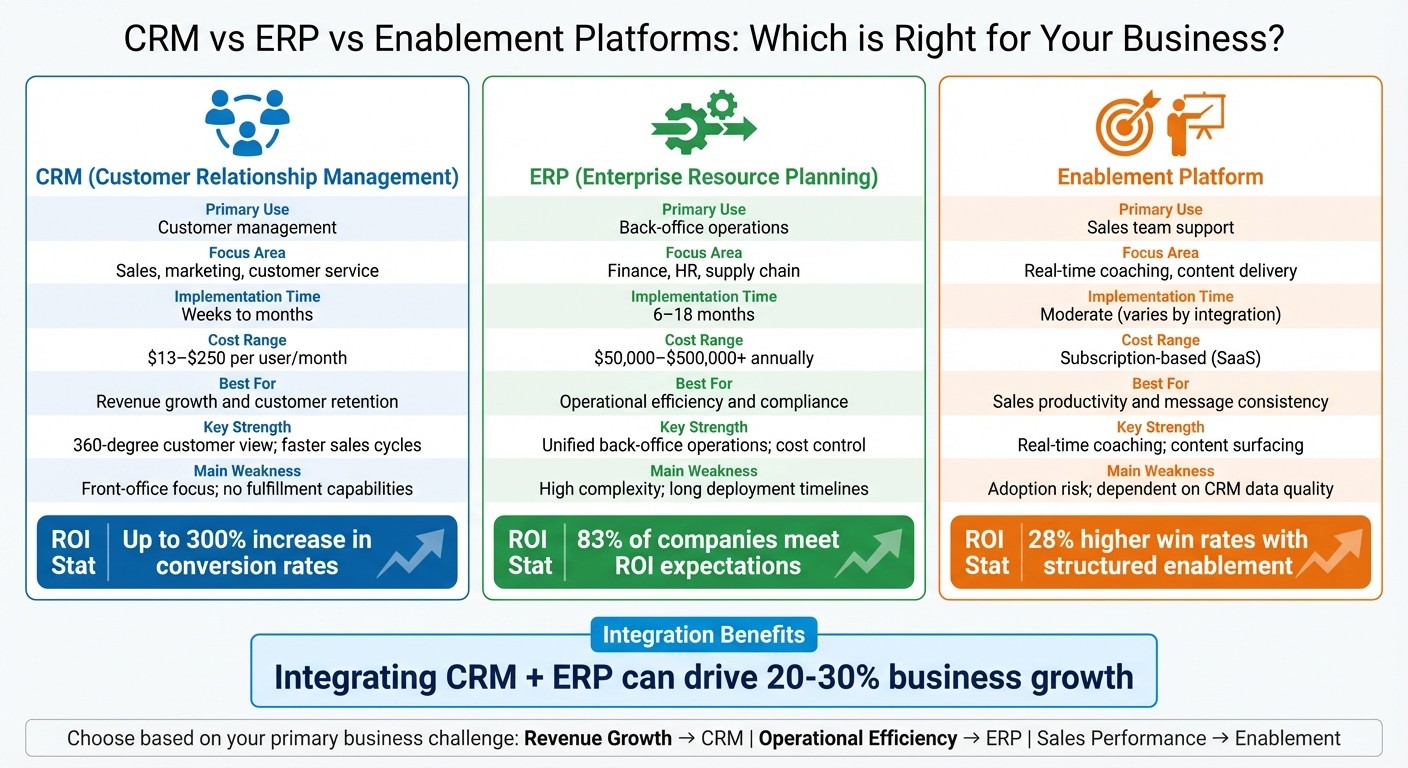
CRM vs ERP vs Enablement Platforms Comparison Chart
1. CRM (Customer Relationship Management)
Core Functionalities
A CRM serves as a centralised system for managing all customer-related data. It stores contact information, tracks interaction history, records customer preferences, and logs communication details. CRMs also visualise sales pipelines, showing the status and progress of each deal, which helps sales teams prioritise their efforts. By automating tasks like logging calls, sending follow-up emails, and assigning leads, CRMs free up time for sales teams to focus on closing deals. Additionally, real-time dashboards provide insights into sales performance, team activities, and customer behaviours. These platforms also support marketing campaigns and customer service by managing tickets and tracking responses .
Use Cases
Sales teams rely on CRMs to monitor leads, forecast revenue, and manage quotas with a clear view of deal progression . For marketing teams, CRMs help segment audiences for targeted campaigns and track engagement metrics to fine-tune their strategies . Customer support teams use CRMs to handle service requests and maintain detailed communication histories, enabling them to deliver personalised assistance that enhances customer loyalty and reduces churn. By acting as a unified source of information, CRMs prevent the disconnect that often arises when sales and marketing teams work in isolation .
"Thanks to Acumatica's integrated CRM, it is easier to manage information for follow-up of a new sales opportunity. Today, we have a consolidated database that allows us to track new projects and generate new business opportunities."
– Juan Alberto Gonzalez, Commercial Manager, Kepler Construction
Integration and Synergies
CRMs become even more powerful when integrated with other systems across the organisation. For example, connecting a CRM with back-office systems ensures seamless visibility from lead generation to order fulfilment. Sales teams can access real-time inventory levels and order statuses, helping them avoid overpromising on items that are out of stock. Meanwhile, finance teams can use accurate sales data to forecast cash flow . Studies show that integrating CRMs with other internal tools can drive 20% to 30% business growth, while an integrated CRM can increase conversion rates by up to 300%. A standout example is Mann Lake Bee and Agricultural Supply, which used CRM segmentation combined with social media data to differentiate between commercial beekeepers and hobbyists. This approach boosted customer retention in its commercial segment from 20% to 78% over several years.
Scalability and ROI
CRMs are designed to grow with a business, starting with basic contact management and expanding to include advanced automation features. Implementation usually takes 3 to 6 months, offering relatively quick returns compared to more complex systems. The benefits are clear: 47% of companies reported improved customer retention after adopting a CRM, and 64% of salespeople found that generative AI features helped them better personalise customer interactions . Costs vary depending on the solution: cloud-based CRMs for small-to-medium businesses typically range from US$13 to US$79 per user per month, while enterprise-level platforms often start at US$150 to US$250 per user per month.
2. ERP (Enterprise Resource Planning)
Core Functionalities
An ERP system acts as the central hub for a business’s operations. It brings together critical back-office functions like accounting, procurement, production, payroll, and supply chain management into a single, real-time platform, breaking down data silos . By automating processes such as financial close, inventory restocking, and payroll reconciliation, ERPs streamline workflows. Real-time dashboards provide insights into inventory levels, logistics, and financial performance, empowering teams to make faster, informed decisions. This consolidated approach delivers operational improvements across various departments.
"ERP is about keeping the engine running smoothly - budgets balanced, supply chains on time, teams resourced."
– Michael Scheiner, Author, CRM.org
Use Cases
Finance teams depend on ERPs to handle tasks like managing general ledgers, accounts payable and receivable, and creating profit-and-loss statements and balance sheets. HR teams benefit by using ERPs to process payroll, track employee benefits, and maintain detailed records in one centralised system. For supply chain and operations teams, ERPs help track inventory turnover, manage production schedules, and oversee procurement workflows to ensure timely deliveries and smooth shipping.
For instance, N&N Moving Supplies, a multi-location distributor, cut its payroll processing time by an impressive 84% after adopting NetSuite ERP to integrate its accounting and payroll functions. Another example is Green Rabbit, a logistics company handling perishable goods, which transitioned to a unified ERP system in just three months. This move allowed the company to scale to tens of thousands of daily orders and triple its capacity during peak demand without disrupting operations.
Integration and Synergies
ERPs become even more effective when integrated with front-office systems like CRMs. This integration supports processes like the quote-to-cash cycle, where a signed quote in the CRM triggers actions in the ERP, such as creating a sales order, updating inventory, and generating an invoice. Sales teams gain real-time visibility into inventory and order statuses, while finance teams benefit from more accurate sales data for cash flow forecasting.
Studies show that integrating ERP with CRM systems can lead to 20% to 30% growth in business productivity across sales and operations. Additionally, companies using integrated solutions have reported a 25% to 30% drop in billing errors and a 32% improvement in response times for operational tasks.
Scalability and ROI
Cloud-based ERPs offer flexibility, allowing businesses to easily add new locations, product lines, or compliance modules as needed. While cloud systems can be implemented in weeks or months, on-premises systems often take years to deploy. When it comes to ROI, the numbers speak for themselves: 83% of companies that conducted an ROI analysis before implementing an ERP reported meeting their expectations.
For example, Blue Shield of California saved nearly $500,000.00 in operational costs in 2023 by switching from a legacy system to a cloud-based ERP. Pricing models differ; cloud-based ERPs typically follow subscription plans with lower upfront costs, whereas on-premises systems require significant initial investments in hardware and IT staffing.
3. Enablement Platforms
Core Functionalities
Enablement platforms stand apart from CRMs and ERPs by focusing on actionable guidance for sales reps. While CRMs monitor pipeline activities and ERPs handle resource management, enablement platforms answer a critical question: what’s the next best step for a sales rep to close a deal?. These platforms operate as systems of action, providing direction rather than just recording data.
Modern enablement platforms use AI to automate tasks like drafting emails, delivering contextual content, and surfacing insights in real time. Instead of relying on static PDFs, they offer modular content blocks that adjust dynamically - whether for onboarding or live negotiations. For example, if pricing details change, the system updates all playbooks and deal rooms automatically.
A standout feature is in-the-flow delivery. Instead of requiring reps to navigate yet another platform, these tools integrate directly into existing workflows - like Salesforce, Gmail, or Slack. With benchmarks showing response times under 30 seconds, these platforms eliminate the frustration of switching between tools, reducing the risk of "portal fatigue".
"The CRM answers: 'What is happening in the pipeline?' Enablement answers: 'What should the rep do next - and with what assets - to move the deal forward?'"
– The Pedowitz Group
This actionable, real-time approach makes enablement platforms invaluable for modern sales teams.
Use Cases
Despite the wealth of internal content created by enablement and marketing teams, only 60% is ever used effectively. Enablement platforms address this gap by ensuring reps have the right materials at the right moment. Using deal signals like call transcripts and CRM data, these systems automatically surface relevant resources.
For managers and enablement leaders, these platforms track leading indicators of success - such as content adoption, message consistency, and playbook usage - and link them to outcomes like win rates and deal cycle times. This level of insight helps teams pinpoint which strategies are driving results.
Take Avanade, for instance. The global professional services firm implemented Microsoft Copilot for Sales, automating tasks like summarizing meetings, updating CRM records, and preparing client outreach materials. This not only saved time but also reduced the need to juggle multiple apps. Similarly, 64% of sales reps reported that generative AI improved their ability to personalize customer interactions.
Integration and Synergies
Integration is where enablement platforms shine, aligning sales and marketing efforts. By leveraging CRM data, these platforms deliver real-time, context-aware guidance, ensuring reps receive the right content when they need it most. However, clean CRM data is essential - messy or incomplete data can disrupt the flow of actionable insights.
These platforms also bridge the gap between marketing and sales. While marketing teams produce content, enablement platforms ensure it’s accessible and tailored for sales reps. Research shows that fewer than 15% of organizations believe more than 60% of their marketing-created content is used by sellers. Integration solves this issue by making content both discoverable and relevant.
Scalability and ROI
The success of enablement platforms hinges on adoption. If reps perceive these tools as cumbersome, they simply won’t use them. This is why over half of organizations (55.2%) cited low adoption rates as the main reason for switching platforms.
When implemented effectively, enablement programs can lead to impressive results. Teams with structured enablement programs see 28% higher win rates compared to those without. Additionally, these platforms can cut the time it takes new reps to make their first sale by 25%, reducing ramp time from four months to three. Looking ahead, businesses investing in enterprise AI initiatives are expected to boost productivity and problem-solving by 50% in 2024.
To maximize ROI, organizations must align enablement platforms with their existing tech stacks. It’s important to look beyond initial licensing costs and consider factors like Year 2 expenses, time spent maintaining content, and IT resources for integration. Strong data hygiene and collaboration across departments are also critical for leveraging advanced AI features effectively.
"If the platform adds friction instead of removing it, they'll abandon it."
– Melanie Fellay, CEO, Spekit
CRM vs ERP: What’s The Difference? A Comparison for 2026
Advantages and Disadvantages
Each system - CRM, ERP, and enablement platforms - has its own strengths and trade-offs, making them suitable for addressing different operational needs. Here's a closer look at what sets them apart:
CRMs are excellent for centralizing customer data and driving revenue growth. With integrated features, they can significantly improve conversion rates and enhance customer retention. They’re relatively quick to implement, typically taking weeks to a few months, and they offer a faster return on investment by boosting sales velocity. However, CRMs are limited to front-office operations and cannot handle back-office tasks like payroll or inventory management. Additionally, their effectiveness depends heavily on data quality - poor entries can undermine the system’s benefits.
ERPs excel in streamlining operational efficiency by unifying finance, HR, and supply chain processes. This eliminates manual tasks and ensures compliance. However, ERPs come with challenges: they are complex, expensive, and require significant time to deploy - ranging from 6 to 18 months. Costs can vary widely, from $50,000.00 to over $500,000.00 annually. Moreover, their implementation demands extensive collaboration across departments, which can slow down adoption.
Enablement platforms focus on providing real-time guidance and surfacing relevant content for sales representatives. Unlike CRMs, which primarily track pipeline activity, these platforms enhance productivity by integrating actionable coaching into workflows. However, adoption can be a hurdle - 55.2% of organizations have switched platforms due to low usage. Additionally, the effectiveness of AI-driven recommendations depends on clean and accurate CRM data.
Comparison Table
Dimension | CRM | ERP | Enablement Platform |
|---|---|---|---|
Primary Strength | 360-degree customer view; faster sales cycles | Unified back-office operations; cost control | Real-time coaching; content surfacing |
Main Weakness | Front-office focus; no fulfillment capabilities | High complexity; long deployment timelines | Adoption risk; dependent on CRM data quality |
Implementation Time | Weeks to months | 6–18 months | Moderate (varies by integration) |
Cost Range | $13.00–$79.00 per user/month | $50,000.00–$500,000.00+ annually | Varies (typically SaaS subscription) |
Best For | Revenue growth and customer retention | Operational efficiency and compliance | Rep productivity and message consistency |
To decide which system fits your needs, focus on your core operational challenges. CRMs are ideal for boosting revenue and improving customer engagement. ERPs are the right choice for enhancing operational efficiency and ensuring compliance. Meanwhile, enablement platforms are best for driving sales team productivity and maintaining consistent messaging.
Conclusion
Deciding between CRM, ERP, and enablement platforms depends on aligning the right tool with your business's most pressing challenges. CRM focuses on boosting revenue by managing customer relationships and streamlining sales processes. ERP brings efficiency by centralizing back-office functions like finance, payroll, and supply chain. Meanwhile, enablement platforms improve sales performance by offering real-time coaching and delivering the right content at the right moment.
Start by identifying your primary pain point. Struggling with lost deals due to messy lead management or inconsistent follow-ups? CRM can fill that gap. Facing operational hurdles like fragmented financial data, inventory issues, or compliance risks? ERP might be the solution to steady the ship. If your sales team has the tools but struggles with messaging consistency or lengthy ramp-up times, an enablement platform can help bridge that gap. Matching the tool to the challenge ensures your investment directly tackles operational weaknesses.
For many growing businesses, starting with a CRM often makes sense. It secures revenue streams and can deliver returns within 3–6 months. In contrast, ERP systems typically take longer, around 6–18 months, to show results due to their complexity.
Over time, combining CRM and ERP can create a seamless workflow. For example, real-time sales forecasts from CRM can inform production planning and delivery schedules in ERP. This integration has the potential to boost business growth by 20% to 30% by breaking down data silos and improving processes like the order-to-cash cycle. A phased approach to integration allows for smoother adoption, minimizing budget overruns and team burnout.
The market reflects a growing interest in these tools. By 2026, 85% of executives anticipate their teams will rely on AI-driven recommendations for real-time decision-making. Whether you prioritize CRM for growth, ERP for cost management, or enablement platforms for sales execution, understanding these distinctions is key to making a smart investment.
FAQs
Can I use CRM, ERP, and enablement together?
Yes, CRM, ERP, and enablement platforms can work seamlessly together to streamline operations and drive better results. By integrating these systems, businesses can align customer-focused activities with internal workflows, leading to smoother data sharing, fewer silos, and smarter decision-making.
Here’s how they complement each other:
CRM (Customer Relationship Management): Focuses on managing customer interactions and data, helping teams build stronger relationships with clients.
ERP (Enterprise Resource Planning): Oversees core business operations like inventory, finance, and supply chain, ensuring everything runs efficiently behind the scenes.
Enablement Platforms: Equip sales teams with tools such as training modules and content libraries, empowering them to perform at their best.
Together, these platforms create a unified ecosystem that enhances efficiency, improves customer satisfaction, and supports better business outcomes.
What should I implement first for my business?
The best starting point really depends on what your business needs most right now. If boosting customer engagement, increasing sales, or improving marketing efforts is your top priority, then a CRM system is the way to go - it helps you manage relationships and drive revenue effectively. On the other hand, if your focus is on streamlining internal operations like finance or inventory management, an ERP system might be the better choice. For businesses that are growing, it’s smart to tackle the system that solves your most urgent challenge first, whether that’s improving customer-facing activities or optimizing internal processes.
How can I tell if an enablement platform will be adopted?
Adopting new systems or tools successfully hinges on a few key factors. First, simplicity and reliability are crucial - tools must integrate smoothly into existing workflows without causing unnecessary friction. They should also address user needs by minimizing time spent on non-productive tasks, like administrative work, so users can focus on what matters most.
A well-thought-out strategy is equally important. This means involving multiple departments from the start to minimize resistance and ensure everyone is on the same page. To keep things running smoothly long-term, it’s essential to regularly track how the tool is being used and actively gather feedback. This helps identify areas for improvement and keeps users engaged.
Ultimately, prioritizing user-focused design and aligning the tool with broader goals will not only drive adoption but also ensure it delivers real value.